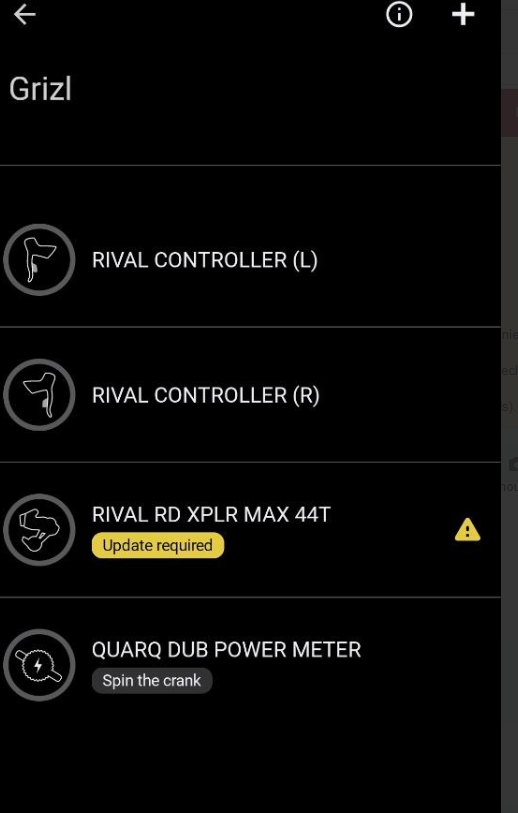
Thank you for contacting SRAM Rider Support. I am sorry to hear that you are having trouble with your SRAM AXS rear derailleur. Here are some troubleshooting steps we can do to try to resolve the issue:
First, follow these troubleshooting steps:
1. Make sure that the device is running the latest update of the SRAM AXS app.
2. Power cycle the device that is being used to access the AXS app (restart the device).
3. Open the AXS app, and make sure to have all permissions enabled.
4. Remove the battery from your rear derailleur.
5. Press and hold the AXS button on your rear derailleur.
6. Reinstall the battery in your rear derailleur.
7. Release the AXS button on your rear derailleur.
8. This should cause the LED to begin to flash yellow/light green. While it is flashing, click the magnifying glass in the AXS app and search for your derailleur.
9. The app should say that your derailleur needs an update; begin the update procedure.
Next, let's do a pairing session to make sure everything is paired to the rear derailleur as the primary component as it should be. Check out our FAQ on how to pair everything properly through the rear derailleur here:
https://support.sram.com/hc/en-us/artic ... -together-
If this doesn't solve the issue, please try doing the update using a different device, preferably one from a different manufacturer or with different operating software.
Please let me know if this solved the issue you were experiencing with your derailleur or not. As much detail as you can provide on the issue and your experience troubleshooting is helpful to report to our internal product team. If the issue isn't resolved with this troubleshooting, the next best step is to talk with your point of purchase. They will be able to do an inspection to see if we missed any other possible factors, and if appropriate, they can also perform a warranty evaluation.